



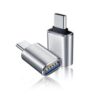
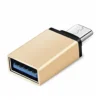
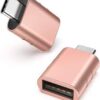
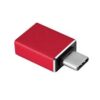
Description
The Problem – USB-C Devices Can’t Connect Standard USB Accessories
Modern laptops, tablets, and phones have USB-C ports instead of the larger USB-A ports. For example, you cannot plug a standard USB flash drive directly into a MacBook or iPad Pro. Similarly, a USB mouse or keyboard cannot connect to a USB-C phone. Furthermore, transferring photos from a camera or memory card reader becomes impossible without extra hardware. As a result, your older USB accessories become useless. This Type C to USB 3.0 OTG adapter solves that problem. Consequently, you can connect any standard USB device to your USB-C device.
USB 3.0 High Speed – Fast Data Transfer
Not all adapters support high speeds. This adapter features USB 3.0 technology. Specifically, it supports data transfer speeds up to 5Gbps. Therefore, you can move large files quickly. For instance, transfer a full movie from a USB drive in seconds. Back up hundreds of photos from your phone to a flash drive. As a result, you save time and frustration.
USB 3.0 is backwards compatible with USB 2.0 devices. Consequently, older peripherals still work.
OTG (On-The-Go) Functionality – Host Mode for Your Device
OTG allows your phone or tablet to act as a host. Specifically, it enables your device to power and communicate with connected peripherals. Therefore, you can use USB devices that previously only worked on computers. For instance, connect a USB keyboard to type documents on your phone. Connect a mouse for precise control. Connect a game controller for mobile gaming. As a result, your smartphone becomes a versatile productivity tool.
OTG functionality is built into most modern Android devices. Consequently, check your device’s compatibility.
Supports Multiple Peripherals – Keyboards, Mice, Flash Drives
This adapter works with a wide range of USB devices. Specifically, it is compatible with:
-
USB flash drives – transfer files to and from your phone
-
Keyboards – type emails, documents, and messages
-
Mice – navigate with precision
-
Game controllers – play mobile games with physical controls
-
Card readers – import photos from camera SD cards
-
External hard drives – access large storage (may need external power)
-
Printers – print directly from your phone (check app support)
For example, plug a USB flash drive into the adapter. Copy files from your phone to the drive. Connect a keyboard to write a document on your tablet. As a result, your phone becomes a miniature computer.
Compact and Portable – Fits in Your Pocket
This adapter is small and lightweight. Specifically, it is about the size of a thumb drive. Therefore, you can carry it everywhere. For instance, keep it on your keyring. Toss it in your laptop bag. Slip it into your wallet. As a result, you always have it when you need to connect a USB device.
The compact design does not block adjacent ports. Consequently, you can use it alongside other cables.
Plug and Play – No Drivers Required
Some adapters need software installation. This adapter is truly plug and play. Specifically, no drivers, no apps, and no complex setup. Therefore, you simply plug it in and it works. For instance, insert the USB-C end into your phone. Plug a USB drive into the adapter. Your phone will recognise the drive immediately. As a result, you can start transferring files in seconds.
Most Android devices support OTG natively. Consequently, no additional configuration needed.
Real Use Cases for UK Users
Consider a photographer who uses an iPad Pro for photo editing on the go. Their camera uses SD cards. To import photos, they need a way to connect a card reader to the iPad’s USB-C port. They use this OTG adapter. They plug the adapter into the iPad. They connect a USB card reader to the adapter. The photos import directly into Lightroom. As a result, they edit and share photos from location without a laptop.
Similarly, a student types notes on their phone during lectures. Typing on a touchscreen is slow and inaccurate. They carry this adapter and a small USB keyboard. They plug the adapter into their phone. They connect the keyboard. Now they can type notes as fast as on a laptop. As a result, they keep up with the lecture and have better notes.
Furthermore, a mobile gamer plays Call of Duty or PUBG on their phone. Touchscreen controls are imprecise. They use this adapter to connect a USB mouse and keyboard. The adapter allows both devices to connect simultaneously (via a USB hub). They aim with the mouse, move with the keyboard. As a result, they have a competitive advantage over touchscreen players.
Wide Compatibility – Works with Most USB-C Devices
This adapter works with a vast range of USB-C devices. Specifically, it is compatible with:
-
Smartphones – Samsung Galaxy, Google Pixel, Huawei, OnePlus, Xiaomi, Sony (with OTG support)
-
Tablets – iPad Pro (USB-C), iPad Air (USB-C), Samsung Galaxy Tab
-
Laptops – MacBook Pro, MacBook Air, Dell XPS, HP Spectre, Lenovo Yoga, Chromebooks
-
Windows devices – Surface Pro, Surface Laptop
For example, use it with your Samsung phone to read a USB drive. Use it with your MacBook to connect a wired mouse. Use it with your Chromebook for extra USB ports. As a result, one adapter serves all your USB-C devices.
Supports External Storage – Expand Your Phone’s Capacity
Phones have limited storage. This adapter lets you use external USB drives. Specifically, plug a USB flash drive or external hard drive into the adapter. Your phone will recognise it as external storage. Therefore, you can:
-
Copy photos and videos to free up space
-
Play movies directly from a USB drive
-
Back up important files
-
Transfer documents between devices
For example, watch a movie from a USB drive on a long flight without using your phone’s storage. Back up your camera roll to a flash drive before a big event. As a result, you never run out of space.
Durable Construction – Built for Daily Use
Cheap adapters break after a few weeks. This adapter is built differently. Specifically, it features a durable plastic or aluminium housing. The USB-C connector is reinforced. Therefore, it withstands daily plugging and unplugging. For instance, the connector does not wobble or loosen. The casing does not crack. As a result, this adapter lasts for years.
The compact design also protects the internal components. Consequently, it survives being carried in a pocket or bag.
USB 3.0 Speeds – 5Gbps Data Transfer
USB 3.0 is significantly faster than USB 2.0. Specifically, USB 3.0 offers speeds up to 5Gbps, while USB 2.0 maxes out at 480Mbps. Therefore, large files transfer in a fraction of the time. For instance, a 1GB movie takes about 2 seconds with USB 3.0 versus over 20 seconds with USB 2.0. Copy a full photo album in seconds. As a result, you spend less time waiting.
The adapter is backwards compatible. Consequently, USB 2.0 devices still work, just at slower speeds.
Reverse Compatibility – Works as a Charging Adapter
Some OTG adapters can also be used for charging. Specifically, you can plug a USB-C charger into the adapter to charge your phone while using peripherals. However, this depends on the specific adapter design. Check the listing for charging support. For instance, some adapters have a second USB-C port for pass-through charging. As a result, you can keep your phone powered during long file transfers.
Even without charging, the adapter uses very little power. Consequently, it does not drain your phone’s battery.
Perfect for Data Recovery – Access Files from Old Drives
Do you have old USB drives with important files? This adapter lets you access them from your phone. Specifically, plug any USB drive into the adapter. Connect the adapter to your phone. Browse the files as if they were on your phone. Therefore, you can recover old documents, photos, and videos without a computer. For instance, find that presentation from years ago. Retrieve family photos from an old backup drive. As a result, you can access your data anywhere.
Great for Presentations – Connect to Projectors and Displays
Some projectors and monitors have USB ports for presentation playback. This adapter lets you connect a USB drive with your presentation. Specifically, load your PowerPoint or PDF onto a USB drive. Plug the drive into the adapter. Connect the adapter to the projector’s USB port (if supported). Alternatively, use it to connect a USB mouse to control a laptop presentation. As a result, you have a backup presentation method.
Works with USB Hubs – Expand Connectivity
Need to connect multiple devices at once? This adapter works with USB hubs. Specifically, plug a USB hub into the adapter. Then connect multiple peripherals to the hub. For instance, connect a keyboard, mouse, and USB drive simultaneously to your tablet. As a result, you create a desktop-like experience from your mobile device.
Ensure the hub is powered if connecting power-hungry devices. Consequently, choose the right hub for your needs.
Important – OTG Support Required on Android
For Android devices, OTG support is required. Specifically, most modern Android phones support OTG, but some budget models may not. Therefore, check your phone’s specifications. For instance, Samsung Galaxy, Google Pixel, and OnePlus devices support OTG. Some Xiaomi phones require enabling OTG in settings. As a result, verify compatibility before purchasing.
iPhones with USB-C (iPad Pro, iPad Air) also support USB devices. Consequently, this adapter works with them as well.
Affordable Solution – No Need for Expensive Hubs
USB-C hubs with multiple ports cost £30-£100. This simple OTG adapter costs a fraction of that. Specifically, it provides the essential function of connecting USB-A devices. Therefore, it is perfect for users who only need one extra port. For instance, a student who just needs to read a USB drive. A photographer who only needs a card reader. As a result, you save money while getting the functionality you need.
The compact size is also easier to carry than a bulky hub. Consequently, ideal for minimalists and travellers.
This universal Type C to USB 3.0 OTG adapter for smartphones, tablets, and laptops is supplied by Sellertree, a UK-based online seller of practical connectivity and mobile essentials.
BULLET POINTS of Type C OTG Adapter
✅ USB 3.0 high speed – data transfer up to 5Gbps
✅ OTG functionality – host mode for phones and tablets
✅ Supports multiple peripherals – keyboards, mice, flash drives, card readers
✅ Plug and play – no drivers or software required
✅ Compact and portable – fits in pocket, on keyring
✅ Wide compatibility – smartphones, tablets, laptops with USB-C
✅ Durable construction – reinforced connector, long-lasting
✅ Great for file transfer, typing, gaming, and presentations
SPECIFICATIONS TABLE ABOUT Type C OTG Adapter
| Feature | Detail |
|---|---|
| Product type | USB-C OTG adapter |
| Connector 1 | USB-C (male) |
| Connector 2 | USB-A (female) |
| USB version | USB 3.0 (5Gbps) |
| Backwards compatible | Yes (USB 2.0, 1.1) |
| OTG support | Required on Android devices |
| Plug and play | Yes – no drivers needed |
| Colour | Gold, Rose Gold, red, silver |
| Dimensions | Compact (thumb drive size) |
| Compatibility | USB-C smartphones, tablets, laptops |
HOW TO USE THIS Type C OTG Adapter
-
Insert the USB-C end of the adapter into your smartphone, tablet, or laptop.
-
Plug your USB device (flash drive, keyboard, mouse, card reader) into the USB-A port on the adapter.
-
Your device should recognise the peripheral automatically.
-
For Android phones, you may see a notification about USB device connected.
-
To access a flash drive, open your file manager app.
-
To use a keyboard or mouse, start typing or moving the cursor.
-
To disconnect, safely eject the USB device from your phone settings, then unplug.
Reviews
There are no reviews yet.