
Description
The Problem – Older Computers Lack WiFi
Many desktop computers and older laptops do not have built-in wireless network capability. For example, a desktop PC in a home office is often stuck with a wired Ethernet cable. Similarly, an older laptop with broken internal WiFi becomes almost useless for internet browsing. Furthermore, upgrading internal hardware is expensive, complicated, or impossible on many machines. As a result, users are tethered to routers or unable to connect at all. This mini USB WiFi adapter solves that problem. Consequently, any computer with a USB port can connect to wireless networks instantly.
150Mbps Speed – Fast Enough for Daily Use
This adapter supports wireless speeds up to 150Mbps. Specifically, it operates on the 2.4GHz band, which offers good range and wall penetration. Therefore, it is ideal for everyday internet activities such as:
-
Web browsing and email
-
Streaming video (YouTube, Netflix, iPlayer) in standard definition and 720p HD
-
Video calls (Zoom, Teams, Skype)
-
Online gaming (casual gaming, not competitive eSports)
-
Music streaming and downloading files
For example, stream a TV show on BBC iPlayer without buffering. Similarly, join a video conference call with stable connectivity. As a result, this adapter meets the needs of most home and office users.
Mini and Compact – Ultra-Portable Design
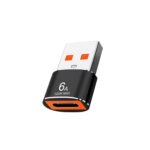
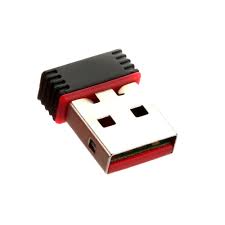
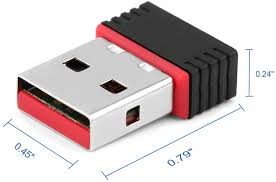
This adapter is remarkably small. Specifically, it is approximately the size of a USB flash drive or even smaller. Therefore, it protrudes only slightly from your computer’s USB port. For instance, leave it plugged into a laptop without worrying about it snapping off in a bag. Similarly, it does not block adjacent USB ports on a desktop PC. As a result, it is perfect for travel, home, and office use.
The low-profile design means you can keep it permanently installed. Consequently, you forget it is there until you need wireless connectivity.
Plug and Play – Simple Installation on Most Systems
Many USB WiFi adapters require complicated driver installation. This one is designed to be user-friendly. Specifically, for Windows 10 and Windows 11, the adapter is often recognised automatically without additional drivers. Therefore, you simply plug it in and connect to your WiFi network. For example, no CD, no downloads, no technical knowledge required. Similarly, for older versions of Windows (7, 8, 8.1), a mini CD may be included with drivers (or available for download). As a result, most users are online within minutes.
For Mac and Linux users, drivers may be available from the manufacturer’s website. Consequently, check compatibility before purchasing if you are not using Windows.
Supports Multiple Security Protocols – Safe Connections
Internet security is important. This adapter supports the latest wireless security standards. Specifically, it works with WPA, WPA2, and WPA3 (depending on model) encryption protocols. Therefore, you can connect securely to password-protected networks. For instance, use it at home, in a coffee shop, or at a hotel without compromising your data. Similarly, it supports WEP for older routers (though WEP is not recommended). As a result, your connection remains private and secure.
Soft AP Mode – Turn Your Computer into a Hotspot
This adapter includes a useful feature called Soft AP (Access Point) mode. Specifically, you can share your computer’s internet connection with other devices. For example, if your PC is connected via Ethernet, you can broadcast a WiFi signal for your phone or tablet. Similarly, share a hotel room’s single wired connection with multiple devices. As a result, the adapter doubles as a virtual router.
Real Use Cases for UK Users
Consider a home worker who has a desktop PC in their home office. The router is in the living room, and running an Ethernet cable through the house is impractical. This mini USB WiFi adapter allows the desktop to connect wirelessly. Accordingly, the workspace stays tidy without cables. As a result, the home worker enjoys reliable internet without drilling holes or hiring an electrician.
Similarly, a student has an older laptop whose built-in WiFi card has failed. Replacing the internal card is expensive and requires technical skill. This USB adapter plugs into a USB port and restores wireless connectivity instantly. For instance, they can attend online lectures, submit assignments, and stream study materials. Consequently, the laptop is saved from the scrap heap.
Furthermore, a traveller stays in hotels that only offer wired Ethernet connections in the room. Their devices (phone, tablet) need WiFi. They plug this adapter into their laptop, use Soft AP mode, and create their own personal hotspot. As a result, all their devices connect to the internet through one wired port.
Likewise, someone building a home server or media centre needs WiFi connectivity but the motherboard lacks it. This adapter adds wireless networking without taking up a PCIe slot. Consequently, the server is up and running quickly.
Works with Windows 7, 8, 10, 11 – Broad Compatibility
This adapter supports a wide range of Windows operating systems. Specifically:
-
Windows 11 – plug and play, fully compatible
-
Windows 10 – plug and play, fully compatible
-
Windows 8 / 8.1 – driver may be required (included or downloadable)
-
Windows 7 – driver required (included on mini CD or downloadable)
For example, revive an old Windows 7 desktop and give it wireless connectivity. Similarly, add WiFi to a brand new Windows 11 PC that lacks it (some budget desktops omit WiFi). As a result, one adapter works across generations of computers.
What About Mac and Linux?
This adapter is primarily designed for Windows. However, it may work on Mac and Linux with additional drivers. Specifically:
-
Mac (macOS) – driver may be available from the chipset manufacturer. Not all macOS versions are supported.
-
Linux – many Linux distributions include drivers for popular chipsets (e.g., Realtek RTL8188EU or similar). Check your distribution’s compatibility.
For example, Ubuntu users often find this adapter works out of the box. Similarly, Raspberry Pi users can use this adapter to add WiFi to their device. As a result, advanced users may find it useful beyond Windows.
Range – Covers a Typical UK Home
This adapter supports 2.4GHz WiFi, which offers good range through walls. Specifically, in a typical UK home (brick walls, multiple floors), you can expect a range of 10-30 metres depending on obstacles. Therefore, it works reliably in most houses and flats. For instance, a desktop on the second floor connects to a router on the ground floor. Similarly, a laptop in the garden connects to the house router. As a result, you stay connected throughout your home.
Antenna – Internal, Low Profile
This adapter has a built-in internal antenna. Specifically, there is no external antenna to snap off or adjust. Therefore, it is robust and portable. For example, pack it in a laptop bag without worrying about damage. However, the range may be slightly less than adapters with large external antennas. For most users, the internal antenna provides adequate coverage. As a result, it is a trade-off between portability and extreme range.
Important Note – Not for Gaming or 4K Streaming
This adapter is rated for 150Mbps on the 2.4GHz band. For competitive online gaming (low ping required) or 4K video streaming (high bandwidth required), a faster dual-band adapter (5GHz) or Ethernet cable is recommended. For example, a 150Mbps adapter may introduce slight lag in fast-paced shooters. Similarly, 4K Netflix may buffer during peak times. As a result, this adapter is best for everyday use, not demanding applications.
LED Indicator – Shows Connection Status
This adapter features a small LED light. Specifically, the LED blinks or glows steadily to indicate power and network activity. Therefore, you can quickly see if the adapter is working. For example, no light means no power. A blinking light means data is being transferred. As a result, troubleshooting is straightforward.
This mini 150Mbps USB WiFi wireless network adapter dongle is supplied by Sellertree, a UK-based online seller of practical computer and networking essentials.
BULLET POINTS
✅ Add WiFi to any computer – desktop or laptop with a USB port
✅ 150Mbps speed – fast enough for web browsing, streaming, video calls, and casual gaming
✅ Mini and compact – ultra-small design, fits in a laptop bag, does not block adjacent ports
✅ Plug and play on Windows 10/11 – no driver installation needed for most users
✅ Supports WPA/WPA2/WPA3 security – connect securely to protected networks
✅ Soft AP mode – turn your computer into a WiFi hotspot
✅ Wide compatibility – Windows 7, 8, 10, 11 (drivers included for older versions)
✅ Great for older computers – revive PCs without built-in WiFi or with broken internal cards
SPECIFICATIONS TABLE ABOUT Mini USB WiFi Adapter
| Feature | Detail |
|---|---|
| Product type | USB WiFi network adapter |
| Max speed | 150Mbps |
| Frequency band | 2.4GHz only |
| Interface | USB 2.0 (compatible with USB 3.0/3.1) |
| Antenna | Internal (low profile) |
| Security protocols | WEP, WPA, WPA2, WPA3 (depending on model) |
| Soft AP mode | Yes (create a hotspot) |
| Plug and play | Windows 10/11 (automatic), Windows 7/8 require driver |
| Mac support | Limited (driver may be available) |
| Linux support | Varies (check chipset compatibility) |
| LED indicator | Yes (power/activity) |
| Dimensions | Approx. 2-3cm (USB flash drive size) |
HOW TO USE THIS Mini USB WiFi Adapter
-
Plug the USB WiFi adapter into a free USB port on your computer.
-
For Windows 10/11, wait a few seconds for automatic driver installation.
-
For older Windows versions, insert the included mini CD or download drivers from the manufacturer’s website.
-
Click on the WiFi icon in your system tray (bottom right of screen).
-
Select your wireless network from the list of available networks.
-
Enter your WiFi password and click Connect.
-
For Soft AP mode, access the adapter’s settings and enable the hotspot feature.