
Description
The Problem – Type-C Devices Can’t Connect to Standard USB Peripherals
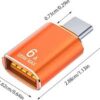
Modern phones, tablets, and laptops use USB-C ports, but many accessories still use USB-A. For example, you might want to connect a USB flash drive to your phone, but your phone has no USB-A port. Similarly, you cannot plug a wired keyboard, mouse, or game controller into a tablet without an adapter. As a result, you are limited to using only Bluetooth accessories or cloud storage. This 6A USB-C OTG adapter solves that problem. Consequently, you can connect any USB-A device directly to your Type-C smartphone, tablet, or laptop.
6A High Current Support – Fast Charging for Power-Hungry Devices
This adapter supports up to 6A high current charging . Specifically, it is designed for fast charging and can handle up to 120W of power delivery . Therefore, you can charge your laptop, tablet, or smartphone quickly through the adapter. For instance, connect your USB-C charger to the adapter and your device charges at full speed. As a result, you do not have to sacrifice charging speed for connectivity.
The adapter features a metal shell for excellent heat dissipation . Consequently, it stays cool even during fast charging.
USB 3.0 Data Transfer – Fast File Transfers
This adapter supports USB 3.0 high-speed data transfer . Specifically, it can transfer data up to 10Gbps (depending on the specific model) . Therefore, you can quickly move large files, videos, photos, and music between devices. For instance, transfer a full HD movie in seconds. Back up your phone’s photo library to a USB flash drive. As a result, you save time and avoid slow wireless transfers.
The adapter is also backward compatible with USB 2.0 devices . Consequently, it works with older peripherals too.
OTG Functionality – Turn Your Phone into a Host Device
On-The-Go (OTG) technology allows your phone or tablet to act as a host device . Specifically, with this adapter, you can connect a wide range of USB peripherals directly to your Type-C device. For instance:
-
USB flash drives – transfer files and free up phone storage
-
Keyboards and mice – navigate your phone or tablet like a computer
-
Game controllers – play mobile games with Xbox, PlayStation, or other gamepads
-
Card readers – import photos from your camera’s SD card
-
Printers – print photos and documents directly from your phone
-
External hard drives – access large files on the go
For example, plug a USB flash drive into your phone to watch a movie without downloading it . Connect a keyboard to your tablet for faster typing. As a result, your phone or tablet becomes a versatile computing device.
Plug and Play – No Drivers or Software Required
This adapter is truly plug and play . Specifically, no additional drivers or software are needed. Therefore, you simply connect the adapter and start using it. For instance, plug it into your phone’s Type-C port, then plug in your USB device. Your phone recognises the device immediately. As a result, no technical setup or configuration is required.
The adapter works with most Android and Windows devices that support OTG . Consequently, broad compatibility.
Three Colour Options – Silver, Orange, and Black
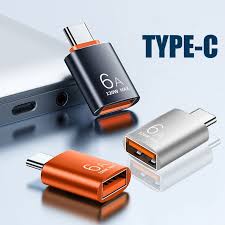
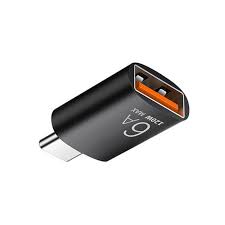
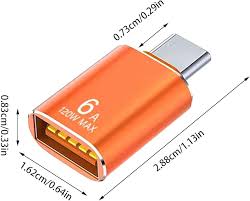
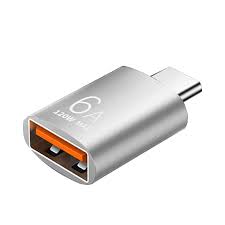
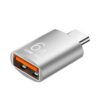
This adapter is available in three stylish colours. Specifically, silver, orange, and black . Therefore, you can choose the colour that suits your style or matches your devices. For instance, silver is sleek and professional. Orange is vibrant and easy to spot. Black is classic and understated. As a result, you can personalise your tech accessories.
All colours have the same high-quality performance. Consequently, the choice is purely aesthetic.
Compact and Portable – Fits in Your Pocket
The adapter is small and lightweight. Specifically, it measures approximately 29 x 15 x 6mm . Therefore, it fits easily in a pocket, bag, or pencil case. For instance, keep one in your laptop bag for work. Keep one on your keychain for everyday carry. As a result, you always have the right connection when you need it.
The durable aluminium alloy shell protects the adapter . Consequently, it withstands daily wear and tear.
Wide Compatibility – Works with Most Type-C Devices
This adapter is compatible with a vast range of Type-C devices. Specifically, it works with:
-
Smartphones – Samsung Galaxy, Google Pixel, Huawei, OnePlus, Xiaomi, OPPO, and more
-
Tablets – iPad Pro (USB-C models), Samsung Galaxy Tab, Huawei MediaPad
-
Laptops – MacBook, Dell XPS, HP Spectre, Lenovo Yoga, and other USB-C laptops
-
Other devices – any device with a USB-C port that supports OTG
For example, use it with your Samsung phone to connect a USB drive. Use it with your iPad Pro to connect a keyboard. Use it with your laptop to add an extra USB-A port. As a result, one adapter serves all your devices.
OTG Compatibility – Check Your Device
Most Android devices support OTG, but some may require a specific setting. Specifically, OTG must be enabled in your device’s settings . Therefore, if a device does not work immediately, check your device settings. For instance, on some Android phones, OTG is enabled by default. On others, you may need to enable it in the settings menu. As a result, ensure the best compatibility.
For laptops and tablets, OTG support is generally standard. Consequently, no special settings needed.
Durable Aluminium Alloy Shell – Heat Resistant
The adapter is built with a premium aluminium alloy shell . Specifically, the metal housing provides excellent heat dissipation and durability. Therefore, it resists bending, cracking, and overheating. For instance, the aluminium stays cool during fast charging. It protects the internal circuitry. As a result, the adapter lasts for years of regular use.
The alloy shell also gives the adapter a premium, professional feel. Consequently, it looks as good as it performs.
Real Use Cases for UK Users
Consider a student who needs to print a presentation from their phone. They are at a university library with a USB printer. Their phone has only a USB-C port. They use this OTG adapter. They plug the adapter into their phone. They connect the printer’s USB cable to the adapter. They open the document on their phone and print it directly. As a result, they print their work without needing a computer.
Similarly, a photographer wants to transfer photos from their camera’s SD card to their tablet. The camera card reader has a USB-A plug. Their tablet has a USB-C port. They use this adapter. They plug the adapter into the tablet. They connect the card reader to the adapter. They import the photos directly to their tablet’s editing app. As a result, they edit photos on the go without a laptop.
Furthermore, a gamer wants to play mobile games on their phone with a console controller. Their phone has USB-C, but the controller has a USB-A cable. They use this adapter. They plug the adapter into their phone. They connect the controller to the adapter. The game recognises the controller instantly. As a result, they enjoy console-quality gaming on their phone.
Great for Travellers – One Adapter for Many Uses
When travelling, you may need to connect various devices to your phone or tablet. For example, transfer photos from your camera to your phone for social media. Connect a USB drive to watch movies on a flight. Use a keyboard to type emails on your tablet. This adapter does it all. Specifically, it allows you to connect any USB-A peripheral to your Type-C device. As a result, you travel lighter with fewer cables.
The compact size makes it easy to pack. Consequently, it takes up almost no space in your luggage.
Affordable – One Adapter, Unlimited Possibilities
This OTG adapter is very affordable. Specifically, it costs a fraction of buying a new device with more ports. Therefore, excellent value for money. For instance, instead of buying a new laptop with more USB ports, use this adapter to connect your accessories. As a result, you save money and extend the life of your devices.
The durable aluminium construction means it lasts. Consequently, even better value.
Eco-Friendly – Reduces Need for New Devices
Instead of upgrading your device for more connectivity options, use this adapter. Specifically, it adds functionality to your existing devices. Therefore, you can keep your phone or tablet longer. For instance, connect a keyboard, mouse, or external storage without buying a new device. As a result, less electronic waste.
The durable design means it will last through multiple devices. Consequently, even less waste.
Important – Check Your Device for OTG Support
Before purchasing, check that your device supports OTG. Specifically, most Android devices from Android 3.1 onwards support OTG . Most USB-C laptops also support it. For instance, Samsung Galaxy phones, Google Pixel phones, and Huawei phones support OTG. As a result, compatibility is generally excellent.
If you are unsure, check your device’s specifications online. Consequently, avoid any compatibility issues.
This 6A Type-C to USB OTG adapter for fast charging and data transfer in silver, orange, or black is supplied by Sellertree, a UK-based online seller of practical connectivity and mobile essentials.
BULLET POINTS OF 6A USB C OTG Adapter
✅ 6A high current support – fast charging up to 120W for laptops, tablets, and phones
✅ USB 3.0 data transfer – fast file transfers up to 10Gbps
✅ OTG functionality – connect USB drives, keyboards, mice, game controllers, printers
✅ Plug and play – no drivers or software required
✅ Three colours – silver, orange, or black
✅ Compact and portable – fits in pocket or bag
✅ Aluminium alloy shell – durable, heat-resistant, premium feel
✅ Wide compatibility – Samsung, Google Pixel, Huawei, OnePlus, iPad Pro, laptops
SPECIFICATIONS TABLE ABOUT 6A USB C OTG Adapter
| Feature | Detail |
|---|---|
| Product type | USB-C to USB-A OTG adapter |
| Input | USB-C (male) |
| Output | USB-A (female) |
| Charging support | 6A / 120W (fast charging capable) |
| Data transfer | USB 3.0 (up to 10Gbps, backward compatible with USB 2.0) |
| OTG support | Yes – host mode for peripherals |
| Material | Aluminium alloy shell |
| Colours | Silver, Orange, Black |
| Dimensions | Approx 29 x 15 x 6mm |
| Plug and play | Yes – no drivers required |
| Compatibility | Smartphones, tablets, laptops with USB-C and OTG support |
HOW TO USE THESE 6A USB C OTG Adapter
-
Plug the USB-C male end of the adapter into your phone, tablet, or laptop.
-
Plug your USB-A device (flash drive, keyboard, mouse, controller, printer, card reader) into the female end of the adapter.
-
Your device will recognise the USB peripheral automatically.
-
For flash drives, open your file manager to access files.
-
For keyboards or mice, start using them immediately.
-
For game controllers, open your game and start playing.
-
To disconnect, safely eject the USB device (if applicable) and unplug the adapter.
Reviews
There are no reviews yet.