


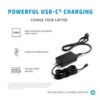
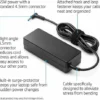
Description
The Problem – A Broken Charger Means a Useless Laptop
Few things are as frustrating as a dead laptop with a broken charger. For example, you have an important deadline tomorrow, and your charger suddenly stops working. Similarly, the original HP charger that came with your laptop has frayed wires or a loose connection. Furthermore, purchasing a HP Laptop Charger from the manufacturer can be expensive and slow to arrive. As a result, many people are left unable to work, study, or stream.
This HP laptop AC adapter solves that problem. Consequently, you get a reliable replacement charger at a sensible price, delivered quickly.
Wide Compatibility – Works with Numerous HP Models
Not all HP laptops use the same charger. This adapter is designed to work with a broad range of HP models. Specifically, it is compatible with HP Pavilion, HP Stream, HP ProBook, HP EliteBook, HP Envy, HP 15, HP 14, and many other series . For example, it fits models that require a 4.5mm x 3.0mm blue tip connector. Similarly, it works with many HP laptops that use a 7.4mm x 5.0mm connector (check your specific model). As a result, a single charger can serve multiple HP laptops in your household or office.
To confirm compatibility, look at your original HP charger. The output voltage and amperage (e.g., 19.5V 3.33A or 19.5V 4.62A ) are printed on the label. Match these specifications to ensure proper function.
Adequate Power Delivery – Typical 45W, 65W, or 90W Options
HP laptops come in different sizes and power requirements. This charger is typically available in 45W, 65W, or 90W versions. Specifically, smaller HP Stream and some Pavilion models use 45W. Most standard HP 14 and HP 15 laptops use 65W . Larger HP Pavilion Gaming or Envy models may require 65W or 90W. Therefore, you can select the correct wattage for your specific laptop. For instance, a 45W charger is sufficient for a basic work laptop. Similarly, a 65W charger is needed for a laptop with a dedicated graphics card. As a result, your laptop charges at the correct speed without overloading the adapter.
Safety Features – Protection for Your Laptop
Cheap, unbranded chargers can damage your laptop. For example, voltage spikes or short circuits can fry the motherboard. Similarly, overheating chargers are a fire hazard. This HP charger includes multiple safety features. Specifically, it has built-in protection against:
-
Over-voltage – prevents too much power from reaching your laptop
-
Over-current – stops excessive current flow
-
Short circuit – shuts down if a fault is detected
-
Over-temperature – prevents the charger from overheating
Therefore, your laptop remains safe while charging. For instance, if there is a power surge at home, the charger protects your device. As a result, you have peace of mind.
LED Indicator – Know When Power Is Flowing
Some replacement chargers lack any status indication. This charger includes a small LED light on the adapter brick. Specifically, the LED glows green or blue when the charger is plugged in and receiving power. Therefore, you can quickly see if the charger is working. For example, when you plug it into the wall, the LED lights up. Similarly, if the LED is off, you know there is a power issue. As a result, troubleshooting is straightforward.
Long Cable – Flexible Positioning
A short cable makes it difficult to position your laptop comfortably. This charger features a generous cable length. Specifically, the AC mains cable is typically 1 metre, and the DC output cable to the laptop is approximately 1.5 to 2 metres. Therefore, you can place your laptop on a sofa, bed, or desk while the charger reaches the wall socket. For instance, work from the comfort of your armchair without sitting on the floor. Similarly, use it in a hotel room where the socket is far from the desk. As a result, you have flexibility and convenience.
Real Use Cases for UK HP Laptop Owners
Consider a university student. Her original HP laptop charger has a frayed cable near the connector. It works intermittently but is becoming unreliable. With exams approaching, she cannot risk her laptop dying mid-essay. She orders this replacement charger. Accordingly, she can study and write essays without interruption. As a result, she meets her deadlines stress-free.
Similarly, a remote worker uses an HP laptop for video calls and spreadsheets. He travels between his home office and a co-working space. Keeping one charger plugged in at each location means he never has to unplug and repack. He buys this charger as a second adapter. Consequently, he simply grabs his laptop and goes, leaving a charger at both desks.
Furthermore, a small business owner provides HP laptops to several employees. Over time, chargers get lost, damaged, or borrowed and not returned. Buying genuine HP replacements for each incident is too expensive. This compatible charger offers a cost-effective alternative. As a result, the business keeps all laptops operational without breaking the budget.
Likewise, a parent hands down an older HP laptop to their child for schoolwork. The original charger was lost months ago. This replacement brings the laptop back to life. Consequently, the child has a device for homework without the family buying a new computer.
What to Check Before Buying – Voltage, Amperage, and Connector
To ensure compatibility, you need to check three things on your original charger or laptop:
-
Output voltage – Usually 18.5V or 19.5V. Match this exactly.
-
Output amperage (Amps or A) – Typically 2.31A (45W), 3.33A (65W), or 4.62A (90W). Equal or higher is safe.
-
Connector size – HP uses several types. The most common is the blue tip 4.5mm x 3.0mm . Also common is the 7.4mm x 5.0mm. Measure your original or look for the model number.
For example, if your original charger says 19.5V 3.33A (65W) and has a blue tip connector, this charger is suitable. Similarly, a 19.5V 2.31A (45W) charger is compatible with lower-power HP Stream models. As a result, checking these details ensures you receive the correct part.
Genuine vs Compatible – Understanding the Difference
This charger is a high-quality compatible replacement, not an official HP-branded charger. Specifically, it is manufactured to meet or exceed original specifications. Therefore, it performs just as well as the original. For instance, it charges at the same speed and includes the same safety protections. However, it does not carry the HP logo or the higher price tag. As a result, you save money without sacrificing quality or safety.
Portable and Lightweight – Take It Anywhere
This charger is compact and lightweight, typically weighing less than 300 grams. Therefore, it is easy to pack in a laptop bag, backpack, or suitcase. For example, take it with you on business trips, holidays, or to the local library. Similarly, keep one in your car for emergencies. As a result, you are never far from power.
This HP laptop AC adapter charger is supplied by Sellertree, a UK-based online seller of practical computer and electronics essentials.
BULLET POINTS
✅ Wide HP compatibility – works with Pavilion, Stream, ProBook, EliteBook, Envy, and HP 14/15 series
✅ Available in 45W, 65W, or 90W – choose the correct power for your specific HP model
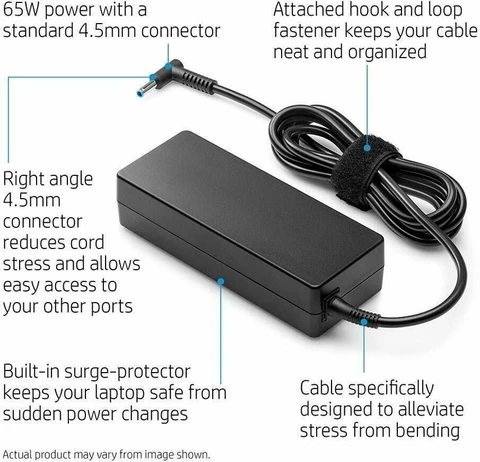
✅ Safety protections – built-in over-voltage, over-current, short-circuit, and over-temperature protection
✅ LED power indicator – shows at a glance when the charger is active
✅ Long cable – flexible positioning, typically 2.5-3 metres total length
✅ Lightweight and portable – easy to carry in a laptop bag for travel
✅ Cost-effective replacement – genuine-quality performance without the premium price
✅ Standard UK 3-pin plug – ready to use in any British home or office
SPECIFICATIONS TABLE ABOUT HP Laptop Charger
| Feature | Detail |
|---|---|
| Brand | Compatible replacement (not HP branded) |
| Input voltage | 100-240V AC, 50/60Hz (worldwide use) |
| Output voltage | 18.5V or 19.5V DC (check your model) |
| Output amperage options | 2.31A (45W), 3.33A (65W), 4.62A (90W) |
| Connector type | Blue tip 4.5mm x 3.0mm (most common) or 7.4mm x 5.0mm |
| Cable length | Approx. 1m AC + 1.5-2m DC |
| Safety approvals | CE, RoHS, UKCA |
| Protection features | Over-voltage, over-current, short-circuit, over-temperature |
| LED indicator | Yes (on adapter brick) |
| Plug type | Standard UK 3-pin (BS 1363) |
| Colour | Black |
HOW TO USE THIS HP Laptop Charger
-
Check your original HP charger label for voltage and amperage (e.g., 19.5V 3.33A).
-
Select the correct wattage version for your laptop (45W, 65W, or 90W).
-
Plug the AC mains cable into the wall socket.
-
Connect the DC output cable to your HP laptop’s charging port.
-
The LED indicator on the adapter will light up, confirming power is flowing.
-
Your laptop will begin charging – verify by checking the battery icon on screen.
-
When finished, unplug from the wall first, then disconnect from your laptop.

Reviews
There are no reviews yet.